
13 Oct 2026
More Devices, More Cables: Why Your Desk Needs JBM Mart Cable Management Tray
Organize tangled desk wires with the JBM Mart Cable Management Tray. Discover practical cable management ideas for home offices, gaming desks, and workspaces.
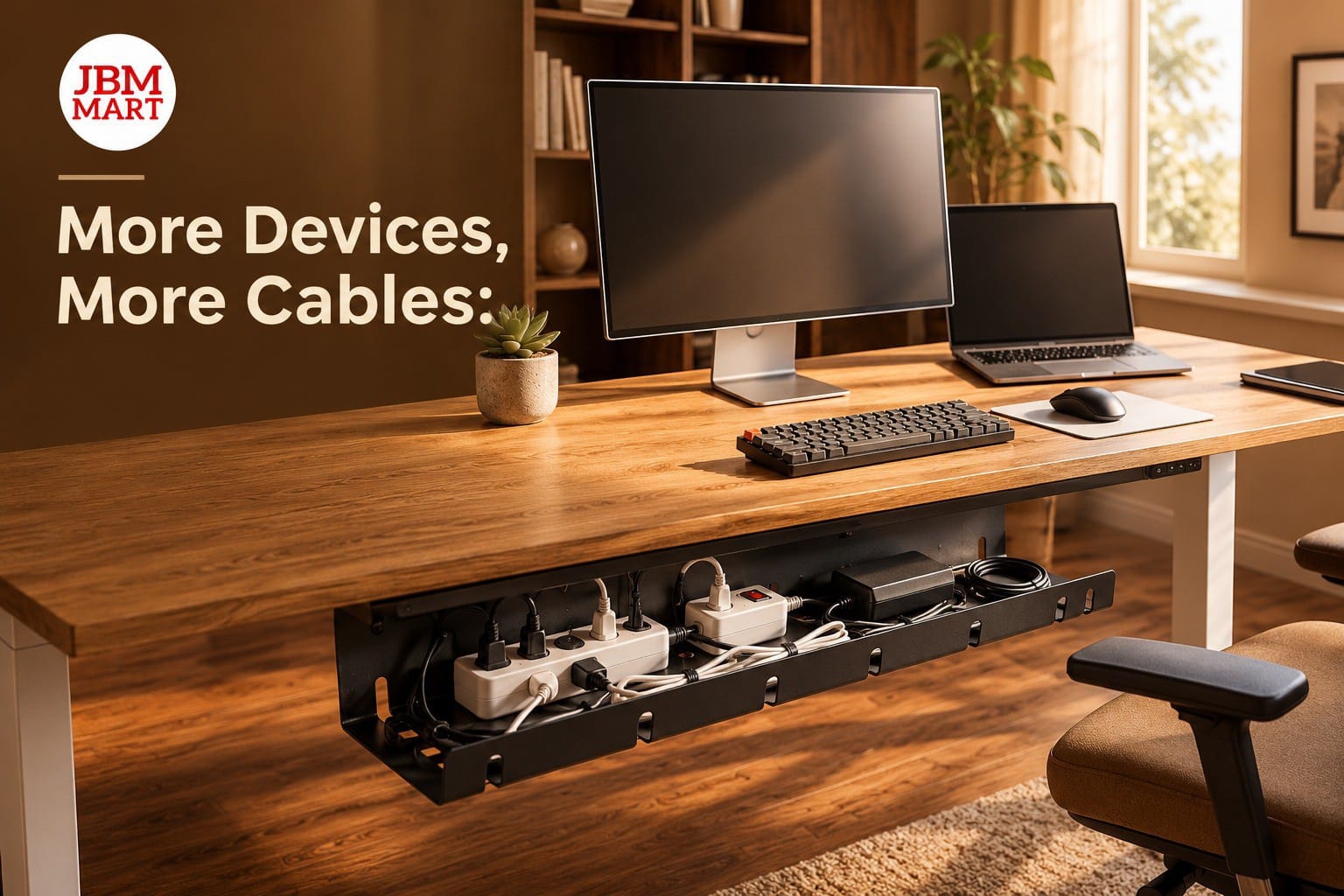
Is Cable Clutter Taking Over Your Desk?
Modern workspaces are filled with electronic devices. From laptops and desktop computers to monitors, chargers, keyboards, speakers, printers, and mobile phones, every device seems to come with another cable. While these gadgets make our daily work easier, managing their wires can quickly become a challenge. A desk that once looked clean and organized can soon turn into a tangled mess of charging cables, extension boards, and power cords. This is where the JBM Mart Cable Management Tray becomes a practical solution for creating a cleaner, more organized, and functional workspace.
Whether you work from home, manage an office, study at a desk, or enjoy a gaming setup, cable organization plays an important role in maintaining a comfortable environment. The JBM Mart Cable Management Tray helps organize loose wires underneath your desk, keeping cables away from your working surface and making your setup look more professional. With the right cable management solution, you can enjoy the convenience of multiple devices without allowing wires to take over your workspace.
1. The More Devices You Use, the More Cables You Need
Think about your everyday workstation. You may have a laptop charger, monitor cable, mobile charging cable, USB hub, keyboard wire, mouse cable, and an extension board supplying power to everything. Add a printer, desk lamp, or speakers, and the number of cables increases even further. Without a proper organization system, these wires can overlap, twist around each other, and create unnecessary clutter. The JBM Mart Cable Management Tray offers an effective way to bring these cables together and keep your workspace organized.
A growing number of people are building multi-device workstations for productivity, online meetings, content creation, gaming, and remote work. Although these setups improve convenience, they also require better cable management. The JBM Mart Cable Management Tray helps keep wires arranged beneath the desk instead of scattered across the floor or hanging from the tabletop. This simple improvement can make even a small workstation feel more spacious and easier to maintain.
2. Create a Clean and Professional Desk Setup
A clean desk can make a noticeable difference in the appearance of your workspace. Loose cables hanging behind a desk or lying around an extension board can make an otherwise attractive setup look unfinished. Whether you are attending a video conference, welcoming a client into your office, or sharing your gaming setup online, the small details matter. The JBM Mart Cable Management Tray helps create a neater appearance by moving cable clutter away from your main working area.
Minimalist desk setups are popular among professionals, students, designers, and gaming enthusiasts. These setups focus on simplicity, functionality, and a clutter-free environment. However, achieving a minimalist look becomes difficult when power cords and charging cables remain visible everywhere. With the JBM Mart Cable Management Tray, you can organize the wires beneath your desk while keeping essential devices within easy reach. The result is a workspace that looks cleaner without sacrificing everyday convenience.
3. Make Better Use of Your Desk Space
Desk space is valuable, especially in apartments, compact home offices, shared workspaces, and student rooms. When chargers, extension boards, and cables occupy the area beneath or on top of a desk, they can make the entire setup feel crowded. The JBM Mart Cable Management Tray helps free up valuable tabletop space by providing a dedicated place for organizing compatible cables and power accessories beneath the desk.
A more organized desk gives you additional room for notebooks, documents, office supplies, and other essentials. It can also make it easier to position your laptop, monitor, and keyboard comfortably. Instead of constantly moving objects around loose wires, you can focus on arranging your workstation according to your needs. By incorporating the JBM Mart Cable Management Tray into your desk setup, you can make better use of the available space and create a more practical working environment.
4. Improve Cable Safety and Reduce Everyday Mess
Loose cables are not just an appearance problem. Wires hanging near your legs, trailing across the floor, or gathering around desk feet can become inconvenient when you move your chair, clean the room, or connect another device. An unsecured cable may also get pulled accidentally, potentially disconnecting equipment or damaging a connector. The JBM Mart Cable Management Tray helps keep cables grouped and positioned more neatly beneath the desk, reducing unnecessary cable movement and floor-level clutter.
A well-organized cable arrangement can also make routine cleaning easier. Instead of moving several loose wires every time you vacuum or wipe the area around your workstation, you can keep more of the cable setup contained beneath the desk. The JBM Mart Cable Management Tray supports a tidier environment by helping keep wires off the floor and away from frequently used areas. Remember to avoid overloading extension boards, keep electrical connections dry and well ventilated, and inspect damaged cables regularly.
5. A Practical Solution for Work-From-Home Offices
Working from home often means creating a workstation within a bedroom, living room, or another shared space. Your desk may need to accommodate a laptop, external monitor, phone charger, router, headphones, and other accessories. When these devices are connected simultaneously, cables can quickly become difficult to manage. The JBM Mart Cable Management Tray is a useful addition to a home office because it helps organize the wires underneath the desk and keeps the visible workspace cleaner.
A comfortable home office should balance productivity, convenience, and appearance. You do not need a large room or expensive furniture to achieve an organized setup. Small improvements, such as arranging cables, positioning your monitor correctly, and keeping frequently used accessories accessible, can make your workstation more functional. The JBM Mart Cable Management Tray helps support this organized approach, making it easier to maintain a neat desk for daily tasks, online meetings, and focused work sessions.
6. Keep Your Gaming Setup Looking Clean
Gaming desks often contain more electronic equipment than a standard workstation. A gaming PC, monitor, console, controller charger, speakers, headset stand, RGB lighting, and networking accessories can all contribute to cable clutter. Even a carefully designed gaming setup can lose its visual appeal when wires hang behind the desk or collect around the floor. The JBM Mart Cable Management Tray helps organize cables beneath the desk, allowing gamers to create a cleaner and more streamlined setup.
For gamers who enjoy minimalist desk aesthetics, organized cables are just as important as the monitor, keyboard, mouse, and lighting. Keeping wires arranged underneath the tabletop can also make it easier to access connections when upgrading equipment or rearranging peripherals. The JBM Mart Cable Management Tray is a practical option for gamers who want a more organized gaming desk without leaving cables scattered around their chair and equipment. While it does not improve gaming performance directly, it can improve the overall appearance and usability of the setup.
7. Make Office Cable Management Easier
In a professional office, cable clutter can become a shared problem. Workstations may have computers, monitors, desk phones, charging stations, printers, and other equipment connected throughout the day. Unorganized wires can make desks look messy and complicate cleaning, maintenance, and equipment changes. The JBM Mart Cable Management Tray helps create a more structured cable arrangement by providing a dedicated space beneath the desk for compatible cables and accessories.
For businesses that are upgrading their offices or setting up new workstations, cable management should be considered alongside furniture and equipment selection. A planned cable arrangement can simplify routine maintenance and make the workspace easier to manage as devices are added or replaced. Using the JBM Mart Cable Management Tray as part of an office organization strategy helps keep cables together and supports a professional-looking environment. For shared offices, it is also useful to label important connections so employees can identify the correct cables when needed.
8. Why Under-Desk Cable Management Is a Smart Choice
There are several ways to organize cables, including cable clips, sleeves, ties, boxes, and under-desk trays. Each option serves a different purpose. Clips can guide individual wires along an edge, cable sleeves can bundle several cords together, and cable ties can help control excess length. An under-desk tray provides a dedicated area for arranging compatible wires and certain power accessories. The JBM Mart Cable Management Tray is especially useful when the goal is to move cable clutter away from the visible desk surface.
When choosing a cable management solution, consider the number of devices you use, the available space beneath your desk, and the type of installation required. Check the tray dimensions, mounting method, weight capacity, and compatibility with your desk before purchasing. The JBM Mart Cable Management Tray can be part of a complete organization system, working alongside cable ties and other accessories to keep your workstation neat. For best results, arrange the cables before securing them and leave enough slack for devices that need to move.
9. Simple Tips for Organizing Your Desk Cables
You do not need to disconnect every device or completely redesign your desk to improve cable organization. Start by identifying which cables you use regularly and removing unnecessary wires from your setup. Group cables according to their purpose, such as power, display, charging, and peripheral connections. The JBM Mart Cable Management Tray can then help keep the organized cables together beneath the desk, making the entire arrangement easier to maintain.
Follow these simple cable management tips for a cleaner workspace:
-
Identify every cable: Know which device each cable connects to before rearranging your setup.
-
Remove unused connections: Disconnect obsolete accessories and chargers that are no longer needed.
-
Group similar wires: Keep power cords and peripheral cables organized into manageable groups.
-
Secure excess length: Use suitable cable ties or reusable straps to control loose sections without tightly compressing the wires.
-
Keep connections accessible: Avoid placing the tray where you cannot reach important plugs when needed.
-
Check your installation: Make sure the mounting method is suitable for your desk and that the tray is securely installed.
-
Avoid overcrowding: Leave adequate space around electrical equipment and follow the manufacturer's safety instructions.
By combining these habits with the JBM Mart Cable Management Tray, you can create a more organized workstation that remains easier to clean, maintain, and update as your technology needs change.
10. What to Consider Before Buying a Cable Management Tray
Before choosing a cable management tray, evaluate your current desk arrangement instead of purchasing a product based only on appearance. Count your devices, identify the extension board or accessories you need to accommodate, and measure the available area beneath your desk. The JBM Mart Cable Management Tray should fit your workstation and support the cable arrangement you intend to create.
Pay attention to the tray's dimensions, construction, mounting requirements, and compatibility with your furniture. If your desk has a glass top, a very thin tabletop, or an unusual frame, confirm that the installation method is suitable before proceeding. Also consider whether you need room for future devices. Choosing an appropriate JBM Mart Cable Management Tray can help you establish an organized cable management system that adapts to your daily work routine. Always check the product specifications for supported accessories and installation requirements rather than assuming that every extension board or power adapter will fit.
11. Why Choose JBM Mart for a More Organized Workspace?
Creating an efficient workspace involves more than purchasing electronic devices. The accessories used to arrange those devices also influence how comfortable, practical, and visually appealing your desk becomes. The JBM Mart Cable Management Tray is a workspace organization solution for people who want to manage excess cables and maintain a cleaner desk environment. Whether you are organizing a home office, upgrading a gaming station, or improving an everyday computer desk, cable management is a useful step towards a more functional setup.
At JBM Mart, the focus is on practical products that support everyday organization and space utilization. When exploring the JBM Mart Cable Management Tray, review the available product specifications, dimensions, installation details, and compatibility information to find the right option for your workspace. Pairing suitable cable management accessories with thoughtful desk organization can help you build a setup that looks neat and works efficiently for your needs.
12. Frequently Asked Questions (FAQs)
Q1. What is a JBM Mart Cable Management Tray used for?
The JBM Mart Cable Management Tray is designed to help organize desk cables and keep compatible wires arranged beneath the desk. It can help reduce visible cable clutter in home offices, gaming setups, study areas, and professional workstations.
Q2. Can a JBM Mart Cable Management Tray be used for a gaming desk?
Yes, the JBM Mart Cable Management Tray can be useful for organizing compatible cables connected to gaming monitors, computers, consoles, chargers, and peripherals, provided the tray has sufficient space for the intended arrangement.
Q3. Does a JBM Mart Cable Management Tray help save desk space?
The JBM Mart Cable Management Tray can help free up tabletop space by moving cable clutter and suitable accessories underneath the desk, depending on the installation and the items stored.
Q4. Is a JBM Mart Cable Management Tray suitable for a home office?
The JBM Mart Cable Management Tray can be a practical addition to a home office where several devices are connected to the same workstation. Check the product dimensions and mounting compatibility before installation.
Q5. How do I install a JBM Mart Cable Management Tray?
To install the JBM Mart Cable Management Tray, first check the product's instructions and confirm that your desk supports the required mounting method. Measure the available space, install the tray securely, and arrange the cables without pulling, pinching, or tightly bending them.
Q6. Can a JBM Mart Cable Management Tray improve desk aesthetics?
Yes, the JBM Mart Cable Management Tray can help create a cleaner desk appearance by keeping loose wires out of sight and organizing compatible cables beneath the tabletop.
Q7. Is a cable management tray better than cable ties?
Cable ties help bundle individual wires, while a tray provides a dedicated space for organizing cables beneath the desk. The JBM Mart Cable Management Tray can work alongside cable ties for a more complete cable organization solution.
Conclusion: Give Your Desk the Organization It Deserves
As we add more devices to our daily routines, cable management becomes an increasingly important part of maintaining a practical and attractive workspace. Tangled wires can occupy valuable space, complicate cleaning, and make even an expensive desk setup look unfinished. The JBM Mart Cable Management Tray offers a practical way to organize compatible cables beneath the desk and create a cleaner environment for working, studying, gaming, and managing everyday tasks.
A better desk setup does not always require n.ew furniture or expensive accessories. Sometimes, organizing what you already own can make a meaningful difference. By combining sensible cable routing, suitable accessories, and regular maintenance with the JBM Mart Cable Management Tray, you can build a workstation that looks more professional and remains easier to use. Explore JBM Mart's workspace organization solutions and take a simple step towards a cleaner, more organized desk.
Related Blogs
16 Oct 2026
JBM Mart 360° Rotating TV Bracket: One Screen, More Than One Perspective
14 Oct 2026
Small Home, Big Storage Problems? How JBM Mart Multi Storage Rack Makes Every Corner More Useful
12 Oct 2026