
26 Aug 2026
How a Tablet Stand Can Turn a Tablet into a Professional Workstation
Discover how a tablet stand can transform your tablet into a professional workstation. Learn about tablet desk setups, adjustable stands, keyboards, second-screen use, and productivity benefits.
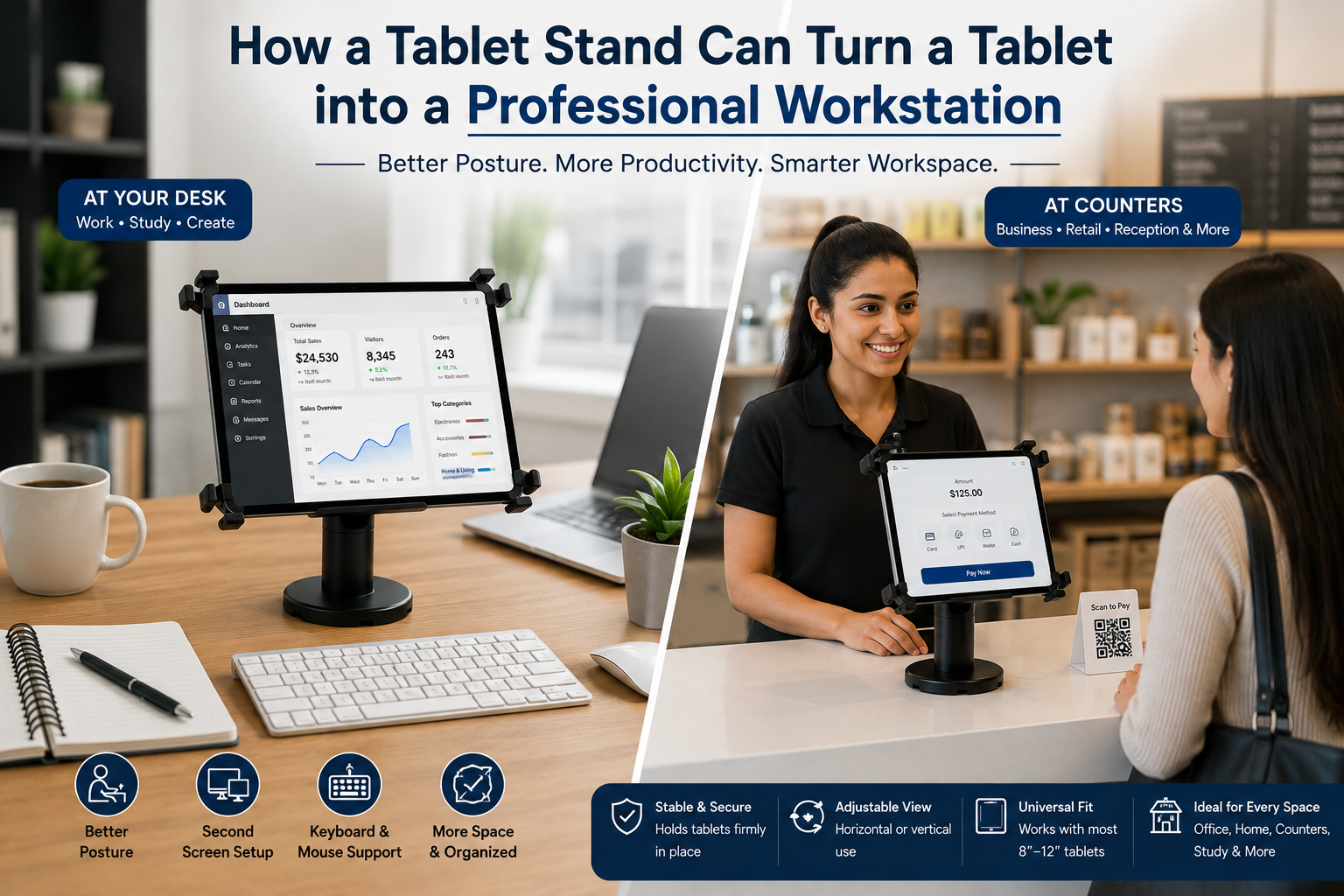
A tablet is one of the most versatile devices you can have. It can be used for browsing the internet, attending online meetings, reading documents, taking notes, watching tutorials, managing emails, creating content, studying, and handling many everyday work tasks.
But there is one problem: how you position your tablet matters.
When a tablet is lying flat on a desk, you may constantly need to pick it up, adjust its position, or bend your head to see the screen. This can make even simple tasks less convenient.
A tablet stand for the desk can completely change this experience.
By placing your tablet on a stable stand, you can create a dedicated workstation where the tablet stays upright, accessible, and positioned according to your needs. Add a keyboard and mouse, and your tablet can start functioning much more like a compact computer workstation.
This is why a tablet stand is not simply an accessory for holding a tablet. It can be the starting point for creating a professional tablet workstation.
What Does a Professional Tablet Workstation Mean?
A professional workstation is a setup designed to make work more organized, comfortable, and efficient.
Traditionally, we think of a workstation as a desk with a computer, monitor, keyboard, mouse, and other office equipment. However, modern devices have made it possible to create smaller and more flexible workstations.
A tablet can become the center of such a setup.
For example:
Tablet + Tablet Stand + Keyboard + Mouse = Compact Tablet Workstation
The tablet provides the screen and computing capabilities, while the stand keeps the screen in a practical position. The keyboard and mouse make typing and navigation easier.
Depending on the tablet's capabilities, you can also add headphones, external storage, a monitor, or other accessories.
The result is a simple workstation that can fit on a relatively small desk.
Why Does a Tablet Need a Stand for a Professional Setup?
You can certainly use a tablet without a stand, but the experience is different.
When you hold a tablet in your hands, you cannot easily type for long periods. When you place it flat on the desk, the screen may not be at a convenient viewing angle.
A tablet stand for work solves this basic problem by giving your tablet a fixed position.
Instead of:
Pick up tablet → Look at screen → Put tablet down → Type → Pick it up again
you can have:
Tablet on stand → Keyboard in front → Continuous workflow
This small change can make your tablet much more suitable for desk-based work.
1. A Tablet Stand Gives Your Tablet a Dedicated Position
The first step in turning a tablet into a workstation is giving it a proper place on your desk.
A tablet lying between your notebook, phone, cables, and other accessories can make the workspace feel cluttered.
A tablet holder for the desk keeps the device in one dedicated location.
This means your tablet is always:
-
Easy to see
-
Easy to access
-
Stable
-
Ready to use
-
Less likely to be moved around
This is particularly useful when the tablet is being used as a regular part of your workday.
2. An Adjustable Tablet Stand Improves the Work Position
A professional workstation needs to be practical for different activities.
You may use your tablet for reading in the morning, attend a video meeting later, and type a document in the afternoon.
An adjustable tablet stand allows you to change the screen position according to the task.
For example, you could position the tablet at a suitable angle for reading and then adjust it when joining a video call.
Some tablet stands also allow the device to be rotated between portrait and landscape orientations.
This flexibility makes the tablet more useful as a workstation because the screen can adapt to different tasks.
3. Add a Keyboard and Turn Your Tablet into a Typing Station
One of the biggest limitations of using a tablet for professional work is typing on the touchscreen for extended periods.
A simple solution is to add an external keyboard. Place the tablet on a stand and keep a keyboard directly in front of it.
Your setup becomes:
Tablet → Stand → Keyboard → Mouse
Now you can comfortably work on emails, documents, online forms, research, reports, and other typing-heavy tasks. This is one of the easiest ways to transform a tablet from a handheld device into a tablet workstation.
4. Add a Mouse for a More Computer-Like Experience
A keyboard can improve typing, but a mouse can make navigation more convenient for users who prefer traditional computer controls.
A tablet stand keeps the screen in position while your keyboard and mouse remain on the desk.
This creates a more familiar computer-style arrangement. Depending on the operating system and applications available on your tablet, this setup can be useful for:
-
Office documents
-
Web browsing
-
Email
-
Online research
-
Business applications
-
Content management
-
Social media management
The exact capabilities will depend on the tablet model and software, but the physical setup is straightforward.
5. Use Your Tablet as a Second Screen
Another way to create a professional workstation is to use your tablet alongside a laptop or desktop computer.
Some tablets and computers support features or applications that allow the tablet to function as a secondary display.
For example:
Laptop: Main project
Tablet: Email, notes, calendar, research, or communication
Without a stand, the tablet may move around the desk or sit at an inconvenient angle. With a tablet stand for the desk, it can remain next to your main screen in a fixed position. This makes it easier to glance at information without constantly switching between applications.
6. Create a Compact Work-from-Home Workstation
Not everyone has a large office desk.
Many people work from bedrooms, living rooms, small offices, or shared spaces where desk space is limited. A tablet workstation can be a practical solution because it doesn't require a large amount of equipment.
A compact setup could include:
-
Tablet
-
Adjustable tablet stand
-
Wireless keyboard
-
Wireless mouse
-
Laptop or monitor, if required
-
Headphones
The tablet can serve as the primary device or as a supporting screen, depending on the work.
This makes a tablet desk setup particularly useful for people who want a flexible workspace without filling their entire desk with equipment.
7. Make Online Meetings More Professional
A professional workstation should also support communication.
Tablets can be used for Zoom meetings, Google Meet calls, Microsoft Teams meetings, online interviews, consultations, and classes. However, holding a tablet during a meeting is not practical.
A tablet stand for the office keeps the device stable and allows you to position the camera toward you.
This means you can:
-
Keep your hands free
-
Take notes
-
Use a keyboard
-
Refer to documents
-
Adjust the screen position
-
Keep the tablet stable during the call
The stand therefore becomes part of the video-meeting setup rather than simply a storage accessory.
8. Keep Reference Material Visible While You Work
Professional work often requires referring to information while completing another task.
For example, you may need to look at:
-
A product specification
-
A PDF
-
A spreadsheet
-
An email
-
A calendar
-
A tutorial
-
A presentation
-
Research information
Instead of repeatedly switching windows, you can place the tablet beside your main computer.
With the tablet on a stand, the information stays visible. This is a simple example of how a tablet stand can improve productivity without requiring complicated equipment.
9. Use the Tablet for Digital Notes and Planning
A professional workstation isn't only about typing.
You may use your tablet for digital note-taking, planning, task management, calendars, or handwritten notes with a compatible digital pen. A stand can keep the screen positioned where you can easily reference it while working.
For example, you could have your task list open on the tablet while completing your main work on a laptop. This turns the tablet into a dedicated planning screen within your workstation.
10. A Tablet Stand Can Help Keep the Desk Organized
A professional workstation should also be organized.
When devices are lying flat, cables and accessories can easily become mixed together. A stand gives your tablet a defined location and can free up some horizontal desk space.
This allows you to keep your keyboard, mouse, notebook, documents, and other accessories where you need them. The goal isn't simply to make the desk look attractive. A more organized workspace can make everyday tasks easier to manage.
How JBM MART Tablet Stand Can Fit into a Workstation
When choosing a tablet stand, the most important thing is to consider how it fits into your actual workflow.
For example, the JBM MART Tablet Stand can be considered as part of a desktop tablet setup where the tablet needs to remain visible and accessible during work.
Instead of using the tablet as a handheld device, you can place it on the stand and position it alongside your laptop, keyboard, or other desk equipment.
This type of setup can be useful when the tablet is being used for:
-
Video meetings
-
Reading documents
-
Online research
-
Digital notes
-
Reference information
-
Work applications
-
Study
-
Presentations
The idea is not that a stand magically makes a tablet a computer. Rather, the stand changes how the tablet is positioned and used, making it easier to integrate the device into a professional desk environment.
That is what makes a tablet stand an important part of a workstation setup.
What Does a Complete Tablet Workstation Look Like?
A professional tablet workstation does not need to be complicated.
Basic Setup
Tablet + Tablet Stand
This is suitable for reading, video calls, watching tutorials, browsing, and reference work.
Productivity Setup
Tablet + Tablet Stand + Keyboard
This is better for emails, documents, notes, and typing.
Complete Compact Setup
Tablet + Adjustable Tablet Stand + Keyboard + Mouse
This creates a more computer-like workstation for compatible tasks.
Multi-Device Setup
Laptop + Tablet Stand + Tablet + Keyboard + Mouse
Here, the laptop can handle the main workload while the tablet provides a second screen or reference display. The best setup depends on what you actually need to accomplish.
How to Choose the Best Tablet Stand for Work
If you are searching for the best tablet stand for work, don't simply choose the first product you find. Consider the following factors.
1. Tablet Compatibility
Make sure the stand can accommodate the size and design of your tablet.
2. Stability
A professional workstation requires a stand that stays stable when you touch the screen or adjust the device.
3. Adjustability
An adjustable stand provides more flexibility for different tasks.
4. Viewing Angle
Choose a stand that allows you to position the screen at a practical angle for your workspace.
5. Rotation
If you frequently use both portrait and landscape modes, rotation can be useful.
6. Desk Footprint
For smaller workspaces, a compact stand can help preserve desk space.
7. Everyday Convenience
The stand should make your tablet easier to use, not make it difficult to access or adjust.
People Also Ask
Can a Tablet Really Become a Workstation?
Yes. A tablet can function as the center of a compact workstation when combined with accessories such as a tablet stand, keyboard, and mouse.
Its actual capabilities depend on the tablet's hardware, operating system, applications, and connectivity. The stand's role is to make the tablet practical for desk-based use by keeping the screen stable and positioned correctly.
How Do I Set Up a Tablet as a Workstation?
Start by placing the tablet on a stable tablet stand for the desk.
Position it at a comfortable viewing angle. If you need to type frequently, add a keyboard. A mouse can also be added if supported.
If you already use a laptop, place the tablet beside it and use it for reference information, communication, notes, or a supported second-screen function.
Is a Tablet Stand Good for Office Work?
Yes. A tablet stand can make a tablet easier to use for office tasks such as video meetings, email, research, document reading, note-taking, presentations, and communication.
It is particularly useful when the tablet needs to remain visible while you work on another device.
Can I Use a Tablet as a Second Monitor?
Some tablets can be used as secondary displays with compatible computers, software, and operating systems.
A tablet stand makes this arrangement more practical because it keeps the tablet in a fixed position beside your primary screen.
Is an Adjustable Tablet Stand Better for Work?
For many work setups, an adjustable tablet stand offers greater flexibility because you can change the viewing angle and position depending on the task.
It can be useful when the same tablet is used for video calls, reading, typing, presentations, and reference work.
Frequently Asked Questions
1. What is the benefit of using a tablet stand?
A tablet stand keeps the device stable, improves its viewing position, frees your hands, and makes it easier to integrate the tablet into a desk workstation.
2. What is the best tablet stand for a desk?
The best tablet stand depends on your tablet size, workspace, and intended use. Look for stability, compatibility, adjustability, and a suitable viewing angle.
3. Can I use a tablet stand with a keyboard?
Yes. A tablet stand and keyboard are an effective combination for creating a compact tablet workstation.
4. Can a tablet stand save desk space?
Yes. By keeping the tablet upright, a stand can reduce the amount of horizontal desk space occupied by the device.
5. Can I use a tablet stand for video calls?
Yes. A stand can keep the tablet stable and positioned toward you during online meetings, interviews, classes, and video calls.
6. Is a tablet stand useful for students?
Yes. Students can use a tablet stand for online classes, digital textbooks, research, note-taking, and educational videos.
7. Can I use a tablet stand for a professional office setup?
Yes. A tablet stand can be integrated into an office workstation for meetings, communication, research, presentations, and other compatible tasks.
8. Can a JBM MART Tablet Stand be used as part of a workstation?
Yes. A JBM MART Tablet Stand can be incorporated into a desktop setup where the tablet needs to remain upright and accessible while working, studying, attending meetings, or using it alongside another device.
Final Thoughts
A tablet already has many of the features needed for productivity, but how you position and use it can make a major difference.
A tablet lying flat on a desk is convenient for occasional use. A tablet positioned securely on a stand, combined with a keyboard and mouse, can become a much more practical part of a professional workstation.
That is the real value of a tablet stand for a desk.
It can turn:
A handheld tablet → into a desk-based device
A desk-based device → into a productivity tool
A productivity tool → into part of a professional workstation
Whether you work from home, manage a small business, attend online meetings, study, create content, or use multiple devices throughout the day, a well-positioned tablet can become an important part of your setup.
A product such as the JBM MART Tablet Stand can fit naturally into this type of arrangement by giving the tablet a dedicated position on the desk.
Ultimately, you don't need an expensive office setup to create a professional workspace. With a suitable tablet stand, a compatible tablet, and a few useful accessories, you can build a compact workstation that is organized, flexible, and designed around the way you actually work.