
14 Aug 2026
How Restaurants Can Use Tablet Stands for Digital Ordering
Discover how restaurants can use tablet stands for digital ordering, easy menu access, and smoother customer service.
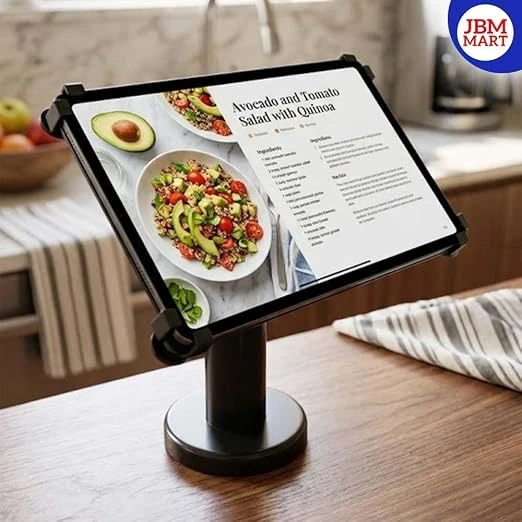
The restaurant industry is changing rapidly as customers become more comfortable using technology while dining. From QR code menus and contactless payments to self-service ordering and tableside POS systems, digital tools are becoming an important part of modern restaurant operations. One simple accessory that can make these systems more practical and organized is a tablet stand.
A tablet stand allows restaurants to securely position a tablet on a counter, reception desk, service area, or dining table.
Research from the National Restaurant Association found that customers across several age groups show strong interest in technology that allows them to order and pay using tablets at the table. In India, digital ordering is also expanding through QR ordering, self-service systems, digital menus, and POS integrations.
What Is a Tablet Stand for Restaurants?
A restaurant tablet stand is a holder or mounting solution designed to keep a tablet stable and accessible during daily operations. Instead of placing a tablet flat on a counter or allowing employees to hold it continuously, the stand keeps the device at a convenient viewing angle.
Depending on the restaurant's requirements, a tablet stand can be used for:
-
Digital menu display
-
Self-service food ordering
-
Tableside ordering
-
POS billing
-
QR code ordering
-
Customer feedback
-
Digital payment
-
Kitchen or staff communication
-
Restaurant management applications
-
Reservation and table management
A good stand can therefore become a small but useful part of a restaurant's digital ordering setup.
Why Are Tablet Stands Useful for Digital Ordering?
A tablet stand provides a fixed and professional position for the device. This can make the ordering process easier to understand and more comfortable.
Tablet-based ordering is particularly useful because it gives restaurants more control over the digital experience than QR ordering on customers' personal smartphones. QR ordering depends on the guest's own device, while tablet ordering allows the restaurant to control the hardware and interface.
1. Use Tablet Stands for Tableside Digital Ordering
One of the most useful applications is tableside digital ordering.
Instead of waiting for a waiter to take the complete order, customers can use a restaurant-provided tablet placed securely on the table. They can browse food categories, view images, read descriptions, select quantities, and customize their meals.
For example, a customer could select:
-
Starter
-
Main course
-
Beverage
-
Dessert
-
Extra toppings
-
Spice level
-
Portion size
-
Special instructions
This can help reduce unnecessary movement between tables and the billing counter.
2. Create a Better Digital Menu Experience
Restaurants can use tablets to create an interactive digital menu with:
-
Food photographs
-
Detailed descriptions
-
Ingredients
-
Allergen information
-
Vegetarian and non-vegetarian categories
-
Popular dishes
-
Chef recommendations
-
Today's specials
-
Combo meals
-
Add-ons
-
Desserts
-
Beverages
Unlike printed menus, digital menus can be updated without printing an entirely new set of menus. Digital menu systems can allow restaurants to update prices, availability, and menu information more easily.
3. Make Self-Service Ordering Easier
Self-service ordering is becoming increasingly common in quick-service restaurants, cafés, food courts, and fast-casual businesses.
A tablet mounted on a stable stand can function as a small self-ordering station. Customers can select their meals themselves instead of waiting at the counter.
The process can be simple:
Select → Customize → Review → Order → Pay
The National Restaurant Association reported that many limited-service customers are interested in technologies such as self-service kiosks and smartphone ordering because they can make transactions faster and more efficient.
4. Reduce Order-Taking Errors
Miscommunication is one of the challenges of traditional manual ordering.
A customer may say an item name incorrectly, a waiter may misunderstand a customization, or an instruction may be missed when the order is entered later.
With digital ordering, customers can select the item and available customization options directly on the screen.
For example:
Burger → Add Cheese → No Onion → Extra Sauce → Confirm
This creates a clearer digital record of the customer's selection.
5. Use Tablet Stands for Staff Ordering
Tablet stands are not only useful for customers.
Restaurants can provide tablets to waiters or service staff for tableside POS ordering. Instead of writing orders on paper and later entering them into the billing system, staff can enter orders directly using a tablet.
A table-side POS allows servers to select tables, add items, send orders to the kitchen, and sometimes process payments directly from the table.
6. Promote Add-Ons and Upselling
Another advantage of digital ordering is the ability to show relevant suggestions while customers are selecting food.
For example, after selecting a pizza, the system could suggest:
Add a beverage?
Add garlic bread?
Try our dessert?
Upgrade to a combo?
Restaurants can also highlight best-selling items, special offers, meal combinations, or seasonal products. A digital interface can present additional recommendations at the right point during the ordering process.
Tablet-based ordering systems can therefore support both convenience and menu merchandising.
7. Make Restaurant Counters More Organized
Restaurant counters can quickly become crowded with billing machines, tablets, payment devices, printers, menus, and other equipment.
A tablet stand helps create a dedicated location for the tablet. Instead of leaving the device flat beside the POS machine, the stand keeps it elevated and visible. This can make better use of counter space and create a cleaner workstation.
For cafés, bakeries, takeaway counters, food courts, and QSRs, a compact tablet stand can be especially useful where counter space is limited.
8. Use Tablet Stands for QR Code Ordering
Not every restaurant needs customers to order directly from a restaurant-owned tablet. Another option is to use a tablet as a digital menu or QR ordering display.
For example, a restaurant can keep a tablet at the entrance or reception counter displaying:
Scan QR → View Menu → Place Order
Customers can scan the QR code using their smartphones and continue the ordering process on their own devices. A tablet stand can keep the QR code screen visible at the correct height and angle.
9. Use Tablet Stands for Customer Feedback
The same tablet used for ordering can also be used for customer feedback.
After the meal, restaurants can ask customers to rate:
-
Food quality
-
Service
-
Cleanliness
-
Ordering experience
-
Overall satisfaction
Restaurants can use this information to understand customer preferences and identify areas for improvement. A stable tablet stand makes the feedback screen easy to access at a reception or billing counter.
Where Can Restaurants Use Tablet Stands?
Tablet stands can be used in many areas of a restaurant.
Dining Tables - Use a tablet stand to provide tableside ordering and digital menu access.
Counter - Place a tablet beside the POS system for billing, ordering, or QR menu access.
Reception - Use a tablet for reservations, customer registration, or digital feedback.
Café Tables - Small cafés can use tablets for digital menus, loyalty programs, and ordering.
Food Courts - Tablet stands can support self-service ordering at busy food counters.
Takeaway Counters - Use tablets to display menus, process orders, or manage pickup information.
Restaurant Kitchen - Staff can use tablets for order monitoring, inventory information, or kitchen management software.
How to Choose the Right Tablet Stand for a Restaurant
Before purchasing a tablet stand, restaurant owners should consider several factors.
1. Tablet Compatibility
Check whether the stand supports the size and model of tablet being used.
2. Stability
The stand should remain stable when customers tap and swipe on the screen.
3. Viewing Angle
An adjustable or suitable viewing angle can make the tablet more comfortable to use.
4. Build Quality
Restaurants experience heavy daily usage, so a durable stand is preferable.
5. Counter or Table Size
Choose a compact design if space is limited.
6. Cable Management
If the tablet needs continuous charging, the stand should allow convenient cable routing.
7. Security
For public-facing tablets, consider a design that helps keep the device secure and difficult to accidentally knock over.
8. Easy Cleaning
Restaurant equipment can be exposed to food particles, dust, and frequent handling. A simple design that is easy to clean can be beneficial.
Frequently Asked Questions About Tablet Stands for Restaurants
What is a tablet stand used for in a restaurant?
A tablet stand holds a tablet securely at a convenient angle. Restaurants can use it for digital menus, self-ordering, POS systems, payments, customer feedback, QR ordering, and staff operations.
Can customers order food directly from a tablet?
Yes. If the tablet has compatible restaurant ordering software, customers can browse the menu, customize items, place orders, and potentially make payments directly from the device.
Are tablet stands useful for QR code ordering?
Yes. A tablet stand can hold a tablet displaying a restaurant's QR code at a visible and convenient angle. Customers can scan the code using their smartphones.
Can a tablet stand reduce restaurant workload?
A tablet stand itself does not reduce workload, but it can support digital ordering systems that reduce manual order-taking and repeated data entry. The overall benefit depends on the software and POS integration.
Are tablet stands suitable for cafés?
Yes. Cafés can use them for digital menus, ordering, payment, loyalty programs, customer feedback, and QR-based ordering.
Can restaurants use tablet stands for POS systems?
Yes. Staff can use tablets with POS or tableside ordering applications. A stand can keep the tablet accessible and organized when it is being used at a counter or service station.
Should every restaurant table have a tablet?
Not necessarily. The right setup depends on the restaurant's size, service style, customer expectations, and budget. Some businesses may benefit from tablets at selected tables, while others may prefer QR ordering.
Are tablet stands better than keeping a tablet flat on the table?
A stand generally provides a more visible and accessible position and helps prevent the tablet from being moved around during use. It can also help organize the table or counter.
Can tablet stands be used for customer feedback?
Yes. A tablet placed at the reception or billing counter can allow customers to submit ratings, reviews, and feedback.
Can restaurants use the same tablet for multiple purposes?
Yes. Depending on the software setup, a restaurant may use one tablet for digital menus, ordering, payment, feedback, reservations, or staff operations.
People Also Ask About Restaurant Tablet Ordering
How does digital ordering work in restaurants?
Digital ordering allows customers or staff to select menu items through a smartphone, tablet, kiosk, or POS device. The order can then be sent digitally to the restaurant's POS or kitchen system, depending on the software integration.
What is a tablet ordering system?
A tablet ordering system is a digital restaurant solution where a tablet is used to browse a menu, select items, customize orders, and submit orders. Some systems also support payments and tableside service.
What are the benefits of digital menus in restaurants?
Digital menus can make menu updates easier, display food images and detailed descriptions, support multiple languages or categories, promote special offers, and integrate with ordering systems.
Is tablet ordering good for restaurants?
Tablet ordering can be useful for restaurants that want to provide self-service options, improve ordering convenience, reduce manual entry, and create a more interactive digital menu experience.
What is the difference between tablet ordering and online food ordering?
Tablet ordering generally takes place inside the restaurant using a restaurant-provided device. Online food ordering usually refers to orders placed remotely through a website, app, or food-delivery platform.
How can restaurants make digital ordering more customer-friendly?
Restaurants should keep the interface simple, use clear food categories, provide accurate descriptions, show prices clearly, offer easy customization, maintain reliable internet connectivity, and provide staff assistance when needed.
For restaurants looking to organize their digital ordering setup, JBM MART tablet stands can be considered for creating a clean and convenient workstation for tablets used in ordering, POS, menu display, and other restaurant applications.