
23 Sep 2026
The Difference Between Hiding Cables and Actually Managing Them
Discover the difference between hiding cables and actually managing them. Learn how the JBM Mart Cable Management Tray helps organize wires, extension boards, and under-desk cables for a cleaner, more practical workspace.
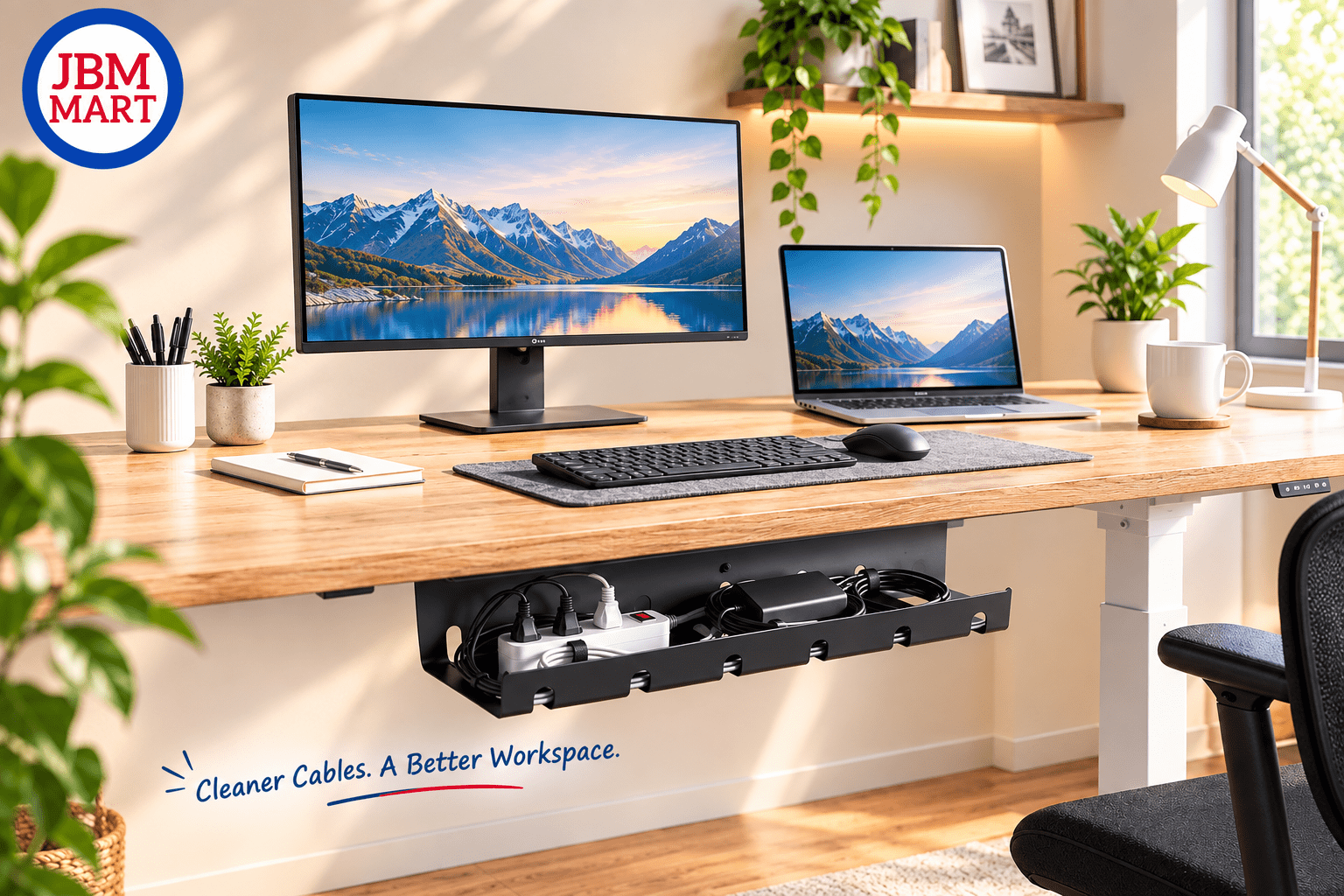
Have you ever cleaned your desk, tucked every wire behind the table, and thought the cable problem was solved—only to find a tangled mess again a few days later? The difference between hiding cables and actually managing them is more important than it seems. The JBM Mart Cable Management Tray helps turn messy cables into an organized cable management system by giving wires a dedicated space instead of simply pushing them out of sight. Whether you are searching for cable management solutions, under-desk cable management, wire organization, or desk cable management, the goal should be to make cables easier to control, access, and maintain.
Hiding Cables Is Not the Same as Managing Them
Hiding cables usually means moving wires somewhere you cannot immediately see them. You might push them behind a monitor, tie them together, or place them underneath a desk. While this can make a workspace look cleaner temporarily, the cables are still loose and difficult to control. The JBM Mart Cable Management Tray takes a different approach by creating a specific location for cables underneath the desk. This makes it easier to organize charging cables, power cords, extension boards, and other wires while keeping them away from the visible workspace. Good wire management is not just about appearance—it is about creating a system that remains practical over time.
Why Simply Hiding Wires Creates Problems
When cables are hidden without being organized, they can become difficult to identify later. Imagine needing to unplug your monitor or replace an extension board and having to search through several tangled wires underneath your desk. The JBM Mart Cable Management Tray can help prevent this situation by keeping frequently used cables and power connections in a more structured location. For people looking for how to organize cables under a desk, this type of setup provides a simple way to separate cable storage from the main working area.
What Does Proper Cable Management Actually Mean?
Proper cable management means arranging cables so they are organized, accessible, protected, and easy to maintain. Instead of letting every wire follow its own path, you create a controlled route for your cables. The JBM Mart Cable Management Tray supports this approach by keeping cables and an extension board together underneath the desk instead of allowing them to spread across the floor. This is especially useful for modern workstations where a laptop, monitor, speakers, phone chargers, printers, and other devices can quickly create a complicated network of wires. Effective desk cable management makes the entire setup easier to understand and maintain.
A Cleaner Desk Is Only One Benefit
A clean-looking desk is one of the most obvious benefits of cable organization, but it is not the only one. The JBM Mart Cable Management Tray can help move cables away from the main working surface, giving you more usable desk space for your monitor, keyboard, documents, or other accessories. Searches such as "how to hide cables under desk," "best cable management for desk," and "under desk wire organizer" often focus on appearance, but good cable management should also improve everyday usability. When wires have a dedicated place, cleaning the desk and rearranging equipment becomes easier.
Hiding Cables Can Make Them Harder to Access
There is a major difference between invisible cables and accessible cables. If you push every wire behind furniture, you may create a cleaner appearance but make future maintenance frustrating. The JBM Mart Cable Management Tray allows cables to remain underneath the desk while keeping them within a more manageable area. This can be useful when you need to unplug a device, change a charger, add another connection, or troubleshoot a power issue. In other words, good cable organization should hide unnecessary visual clutter without making important connections impossible to reach.
Cable Management Helps Reduce the Tangled-Wire Problem
Cable tangling happens when multiple wires cross, overlap, and move freely around each other. Chargers, power cords, USB cables, HDMI cables, and extension-board connections can quickly turn into a confusing bundle. The JBM Mart Cable Management Tray provides a dedicated space underneath the desk where these connections can be grouped instead of being left scattered across the floor. If you are searching for ways to organize tangled wires or how to manage multiple cables, creating a designated cable area is a more sustainable solution than simply tying everything together.
Your Extension Board Needs a Proper Place Too
One commonly overlooked part of cable management is the extension board. Many desks have an extension board sitting on the floor with several chargers and devices connected to it. The JBM Mart Cable Management Tray can help keep the extension board and connected cables underneath the desk, reducing floor-level clutter and making the workstation more organized. This is particularly helpful for people searching for under-desk power strip management, power strip cable management, or extension board organizer solutions. Instead of hiding the extension board somewhere difficult to reach, the idea is to give it a dedicated location.
Better Cable Management Can Make Cleaning Easier
Cleaning around loose cables can be surprisingly difficult. Dust can collect around wires lying on the floor, while moving a desk may require you to first untangle several connections. The JBM Mart Cable Management Tray keeps the cable bundle and extension-board area more controlled underneath the desk, which can make routine cleaning and workspace maintenance simpler. For anyone interested in clean desk setup ideas or minimal desk organization, cable management is one of the practical details that can make a noticeable difference without changing the entire workspace.
Cable Management Is About Creating a System
The biggest difference between hiding cables and managing them is the presence of a system. Hiding is usually a one-time action: move the wires somewhere they cannot be seen. Managing is an ongoing setup where cables have a defined place and can be accessed when required. The JBM Mart Cable Management Tray fits into this second approach by giving your workstation a dedicated cable storage area. Once cables are organized, adding a new device becomes easier because you already have a place for its connection. This makes workspace organization more scalable as your equipment changes.
It Is Useful Beyond Home Offices
Cable management is not limited to a personal computer desk. Offices, reception areas, study tables, gaming setups, workstations, and business counters can all benefit from organized wiring. The JBM Mart Cable Management Tray can be used wherever multiple cables and power connections need to be kept under control. Searches for office cable management ideas, computer desk cable management, and professional workspace organization show how common the need for organized wiring has become. A cleaner cable setup can help create a more structured environment regardless of whether the desk is used for work, study, or entertainment.
A Professional Workspace Needs More Than Hidden Wires
A professional-looking workspace is not simply one where cables cannot be seen. It is one where everything has a logical place. The JBM Mart Cable Management Tray helps contribute to this type of setup by keeping cable connections organized underneath the desk rather than allowing them to become visible clutter. When someone looks under the desk, the difference between random wires and an organized cable area becomes obvious. This is why professional cable management focuses on accessibility, organization, and practicality—not just hiding wires.
Why Under-Desk Cable Management Works So Well
The space underneath a desk is often unused, making it a practical location for cable organization. The JBM Mart Cable Management Tray uses this otherwise wasted area to keep cables and an extension board off the main floor and away from the desktop. This can be especially useful in compact workspaces where every inch of visible desk space matters. If you have been searching for an under-desk cable organizer, under-desk wire management, or desk wire organizer, an under-desk tray can provide a simple way to create a dedicated cable zone.
Good Cable Management Makes Future Changes Easier
Your desk setup rarely stays exactly the same. You may add another monitor, replace your laptop, install speakers, connect a printer, or add a charging station. The JBM Mart Cable Management Tray gives you a structured location where new cables can be incorporated into your existing setup instead of creating another pile of wires. This makes it easier to expand your workstation while maintaining organized cables. A good cable management solution should not only solve today's cable problem—it should make tomorrow's changes easier as well.
Hiding Cables vs. Managing Cables: What Is the Real Difference?
The easiest way to understand the difference is to compare the two approaches. Hiding cables focuses primarily on making wires invisible, while managing cables focuses on organization, accessibility, routing, and long-term maintenance. The JBM Mart Cable Management Tray is designed around the management approach, giving cables and an extension board a dedicated area under the desk. If your goal is simply to make wires disappear for a few minutes, hiding may work. If your goal is a cleaner and more functional workspace that stays organized, cable management is the more complete approach.
How to Build a Better Cable Management Setup
Start by identifying every cable connected to your desk. Separate power cables from charging cables and display or data cables where possible. Remove connections that you no longer use and determine which devices need to remain connected. Then use the JBM Mart Cable Management Tray to create a dedicated area for your power connections and loose wires underneath the desk. Once the main cables are organized, you can improve the setup further with cable clips, ties, or labels where necessary. This combination creates a more practical desk cable management system rather than simply hiding the wires.
The Goal Is a Workspace That Stays Organized
The best cable management setup is one that remains useful after the initial installation. The JBM Mart Cable Management Tray can help establish a permanent location for your cables, making it less likely that wires will gradually spread across your desk or floor again. Once every cable has a place, maintaining the setup becomes much easier. Instead of repeatedly hiding cables whenever the workspace becomes messy, you have a system that helps prevent the mess from returning.
Final Thoughts
There is a clear difference between hiding cables and actually managing them. Hiding wires may improve the appearance of a workspace temporarily, but the JBM Mart Cable Management Tray focuses on creating a dedicated and organized location for cables and extension boards. Good cable management can improve accessibility, reduce tangled wires, free up desk space, and make everyday workspace maintenance easier. Whether you are building a home office setup, gaming desk, study table, or professional workstation, treating cables as something to organize—not simply something to hide—can make the entire setup more practical and easier to maintain.
Frequently Asked Questions
1. What is the difference between cable hiding and cable management?
Cable hiding mainly focuses on making wires less visible, while cable management focuses on organizing, routing, storing, and accessing cables properly. The JBM Mart Cable Management Tray provides a dedicated area underneath the desk to keep cables and an extension board more organized.
2. How do I organize cables under my desk?
Start by removing unnecessary cables, grouping the remaining connections, and placing the extension board and loose wires in a dedicated under-desk area. The JBM Mart Cable Management Tray can help create this organized space for better under-desk cable management.
3. Is an under-desk cable tray useful?
Yes. An under-desk cable tray can keep power connections and cables away from the floor and desktop while making them easier to manage. The JBM Mart Cable Management Tray is designed to provide this type of dedicated cable organization.
4. How can I hide cables without making them difficult to access?
Instead of pushing cables behind furniture, use an organized storage area where wires remain hidden from normal view but can still be reached when needed. The JBM Mart Cable Management Tray helps achieve this balance by positioning cables underneath the desk.
5. What is the best way to manage multiple cables?
Group cables according to their purpose, remove unused connections, keep the extension board in a fixed location, and use cable organizers to control loose wires. The JBM Mart Cable Management Tray can serve as the central storage area for your under-desk cable setup.
6. Does cable management make a desk look better?
Yes. Organized cables can reduce visible clutter and create a cleaner workspace. The JBM Mart Cable Management Tray helps move cables and power connections away from the main desk surface for a more organized appearance.
7. Can cable management help with workspace organization?
Yes. Cable management is an important part of overall workspace organization because it keeps wires from taking up unnecessary space or becoming tangled. The JBM Mart Cable Management Tray can help create a cleaner and more structured workstation.
8. What should I look for in a cable management solution?
Look for a solution that provides enough space for your cables, keeps connections organized, allows reasonable access, and fits your desk setup. The JBM Mart Cable Management Tray is intended for organizing cables and extension-board connections underneath a desk.